
AI Agent Trading: overview & setup
Bitnxs AI Agent Trading is an experimental chat panel inside the Bitnxs app where an LLM you connect (any OpenAI-compatible /v1/chat/completions endpoint, default gpt-4o-mini) reads your live account state, gives a long / short / wait call, and drafts trading actions that you confirm before they execute. It runs in your browser at bitnxs.com/#/agent, uses your own LLM API key, and can only switch markets, switch buy/sell side, place limit orders and read your account. It never changes leverage.
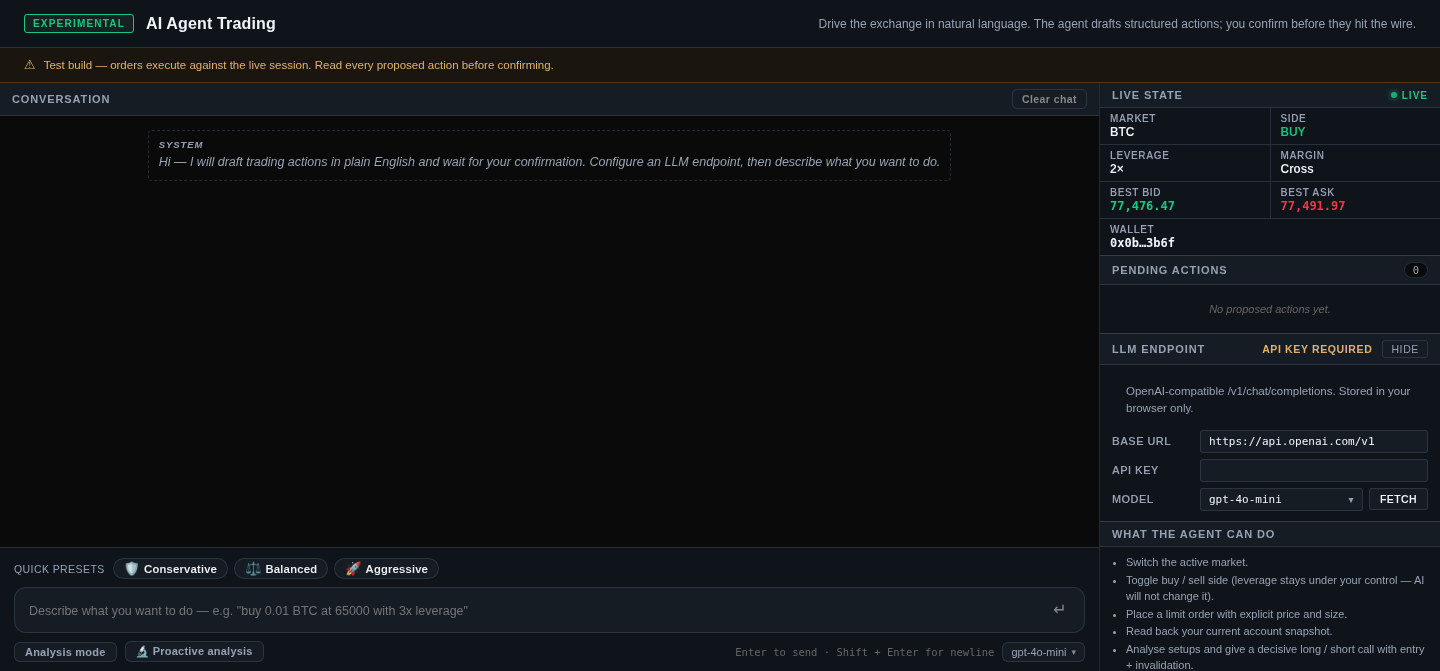
What can the Bitnxs AI agent do?
Section titled “What can the Bitnxs AI agent do?”These are the five capabilities listed in the app:
- Switch the active market.
- Toggle buy / sell side (leverage stays under your control; the AI will not change it).
- Place a limit order with explicit price and size. It can also batch up to 20 limit orders in one action; they are sent one by one, so some may fail while others succeed.
- Read back your current account snapshot.
- Analyse setups and give a decisive long / short call with entry and invalidation levels.
Each turn the agent receives a fresh snapshot: mark / bid / ask, index price, funding rate and countdown, mid prices for all markets, balances, positions, open orders and the number of active TP/SL orders. It is instructed never to invent prices or fills that are not in that snapshot.
What it cannot do: change leverage or margin mode, place market orders, cancel or modify orders, or set TP/SL triggers. There is no withdraw or transfer action.
How do I set up the AI agent? (step by step)
Section titled “How do I set up the AI agent? (step by step)”- Connect your wallet at bitnxs.com (MetaMask or any EIP-1193 wallet) and deposit USDC. See Getting started. Without a connected wallet the agent can chat and analyse but cannot place orders.
- Open the agent: click AI AGENT TRADING (TEST) in the top menu.
- Configure the LLM endpoint in the right-hand panel:
- Base URL: defaults to
https://api.openai.com/v1. Any OpenAI-compatible endpoint that supports streaming works. - API key: your own LLM provider key. It is “stored in your browser only”.
- Model: click Fetch to load the list, then pick one (default
gpt-4o-mini).
- Base URL: defaults to
- Keep “Analysis mode” on (the default). The agent only proposes; each action appears under Pending actions and needs Confirm & execute (or Dismiss).
- Ask something, type your own request or click a Quick preset (Conservative / Balanced / Aggressive). Press Enter to send, Shift + Enter for a new line.
- Review every proposed action, check side, price and size against the live state panel, then confirm or dismiss.
Try the app’s own examples:
Should I go long or short BTC right now? Pick a direction.What is my current position and best quote?Based on your call, buy 0.01 BTC at 65000.What are Analysis mode, Full-auto mode and Proactive analysis?
Section titled “What are Analysis mode, Full-auto mode and Proactive analysis?”| Setting | What it does (from the app) |
|---|---|
| Analysis mode (default) | “The agent only proposes — each action needs your confirmation before it runs.” |
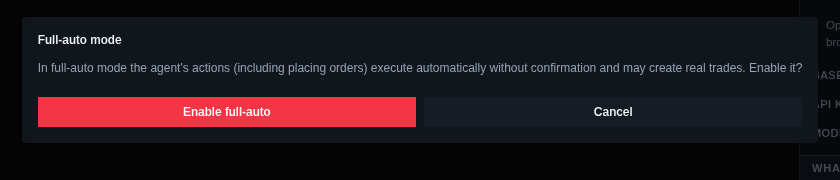
| Full-auto mode | “Actions the agent proposes run automatically, no confirmation.” Turning it on asks for confirmation first. |
| 🔬 Proactive analysis | “When on, the market is analysed automatically every 60s” with three views: 🔬 ANALYST (symbol, direction, conviction 0–100), 🛡️ RISK (ok / warning / halt) and ⚡ EXECUTOR (open / close / hold / wait). |
Can I use Claude, ChatGPT or my own bot instead?
Section titled “Can I use Claude, ChatGPT or my own bot instead?”Yes, two ways:
- In the app: point the LLM endpoint at any OpenAI-compatible API (see step 3).
- Your own agent or script: call the Bitnxs API directly with a scoped API key. See Example use cases for working Python.